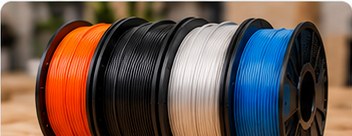
PLA is the material many people meet first when they start FDM 3D printing. It is widely available, comes in an absurd number of colours and finishes, and is generally forgiving enough for learning how a printer behaves.
That does not make every spool identical or PLA suitable for every job. This guide explains what PLA is useful for, how to approach settings and where another material may make more sense.
What is PLA?
PLA stands for polylactic acid. In desktop FDM printing it is supplied as filament, commonly wound onto a spool and fed into the printer’s extrusion system. The hotend softens the material and deposits it in successive layers to build the part.
Different manufacturers modify and blend their materials, so two products labelled PLA can behave differently. Treat the temperature range and handling guidance on the specific spool as your starting point rather than assuming one universal profile.
Why beginners often start with PLA
PLA generally prints without the demanding thermal conditions associated with some other filaments. It can produce sharp details, works well for a huge range of models and is supported by virtually every ordinary FDM slicer profile.
Typical uses include display models, organisers, prototypes, toys, fixtures for light-duty indoor use and general learning prints. It is also useful when you want to test the shape of a design before committing to a more specialised material.
Temperature: use the spool as the starting point
There is no single correct nozzle temperature for all PLA. Pigments, additives, printing speed and hotend design can change what works best. Begin with the manufacturer’s recommended range and a suitable printer profile.
If extrusion looks inconsistent, layer bonding is poor or fine details are becoming soft, temperature may be one of the variables to investigate. Change settings gradually. Altering nozzle temperature, flow, cooling and speed simultaneously produces plenty of activity but very little useful diagnosis.
The first layer matters more than people expect
A reliable first layer gives the rest of the print a fighting chance. The build surface should be appropriate for the printer and material, clean according to the manufacturer’s instructions and correctly positioned relative to the nozzle.
If lines are barely touching, the nozzle may be too far from the surface or another first-layer setting may need attention. If material is being excessively squashed or the nozzle is scraping, the distance may be too small. Automatic probing helps, but it does not repeal geometry.
Cooling and PLA
Part cooling is commonly used with PLA, especially after the initial layers. It can help with overhangs and small features. The correct amount depends on the printer, model and material, so use a known profile before experimenting.
Very small layers can remain soft if the nozzle returns too quickly. Slicers can compensate by slowing small layers or enforcing a minimum layer time.
Does PLA need to be dried?
Filament can absorb moisture from the surrounding air, although the rate and consequences vary by material and environment. If a spool that previously printed well begins showing symptoms such as rough extrusion or unusual popping, moisture is one possibility among several.
Store filament in a clean, dry environment and follow the filament manufacturer’s drying guidance if drying becomes necessary. Avoid guessing at temperatures because excessive heat can deform a spool or damage material.
PLA strengths
- Generally approachable for new FDM users.
- Good surface detail and broad colour availability.
- Suitable for many decorative and light-duty indoor parts.
- Large ecosystem of established slicer profiles.
- Useful for prototypes before moving to more specialised materials.
Where PLA is not the automatic answer
PLA has limitations, particularly where elevated temperatures, sustained mechanical stress or demanding outdoor conditions are involved. A part that looks perfect on a desk may be unsuitable beside a heat source or in a hot vehicle.
Material choice should follow the job. PETG, ASA, ABS, TPU and other filaments have different strengths and complications. No material wins every category, despite the internet’s heroic efforts to conduct that argument indefinitely.
PLA, PLA+ and other labels
Names such as PLA+, PLA Pro, matte PLA, silk PLA and high-speed PLA usually indicate a manufacturer-specific formulation or finish rather than one universal material specification. Settings and mechanical behaviour can therefore differ.
For decorative work, a special finish may be exactly what you want. For functional parts, read the manufacturer’s technical information where available instead of assuming the marketing suffix guarantees a particular property.
Common PLA problems
Stringing
Fine strands between separate parts of a model can relate to temperature, retraction, travel behaviour, material condition and printer setup. Start from a proven profile and make controlled adjustments.
Poor bed adhesion
Check surface cleanliness, first-layer height, bed temperature where applicable and whether the build surface is suitable for the material. Avoid compensating for a mechanical setup problem by endlessly adding adhesive products.
Weak layers
Insufficient layer bonding can involve temperature, excessive cooling, speed or material condition. Part orientation also matters when a functional print will be loaded in a particular direction.
A sensible PLA workflow
- Load a known spool and use the manufacturer’s recommended settings.
- Select a printer/material profile intended for ordinary PLA.
- Print a small calibration or familiar model.
- Inspect the first layer before committing to a long job.
- Change only the setting connected to the symptom you are investigating.
- Save successful profiles and note which filament they belong to.
Bottom line
PLA is popular because it removes some barriers to learning FDM printing, not because it is magically perfect. Use a sensible baseline profile, pay attention to the first layer and choose a different material when the finished part’s environment demands it. Once you have one PLA printing reliably, it also becomes a useful reference point when diagnosing future printer problems.